









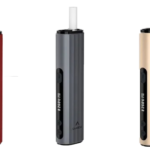

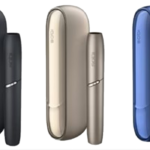

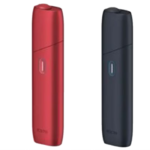


Quick Answer: Disassembling an IQOS device requires careful handling of its heating blade, battery chamber, and cap components. Start by removing the cap, gently extracting the holder from the charger, and using appropriate tools to separate internal components. This process is typically needed for deep cleaning or repairs, but proceed cautiously as improper disassembly can damage the heating element and void your warranty.
Your IQOS device is a sophisticated piece of technology that combines precision engineering with user-friendly design. While Philip Morris International designed these devices for easy maintenance through regular cleaning, there are times when you might need to understand the internal structure – whether for deep cleaning, troubleshooting, or understanding how your device works.
However, it’s crucial to understand that disassembling your IQOS device can void your warranty and potentially damage delicate components like the heating blade.
This guide is for informational purposes and should only be attempted if you’re comfortable with technical procedures.
Why You Might Need to Disassemble Your IQOS
Before diving into the disassembly process, consider whether it’s truly necessary:
- Stubborn residue buildup that standard cleaning can’t remove
- Mechanical issues with the cap or holder mechanism
- Understanding the device for educational purposes
- Battery replacement (though this is rarely recommended)
Most maintenance needs can be addressed through regular cleaning with the official IQOS cleaning tools, which doesn’t require full disassembly. For comprehensive guidance on safer cleaning methods, check out how to clean IQOS at home.
Tools You’ll Need
Gathering the right tools before starting makes the process smoother and safer:
- Small Phillips head screwdriver
- Plastic pry tools or guitar picks
- Tweezers
- Cotton swabs and isopropyl alcohol
- Clean, soft cloth
- Good lighting and a clean workspace
Important: Never use metal tools near the heating blade as they can cause irreversible damage.
Step-by-Step Disassembly Process
Step 1: Power Down and Prepare
Turn off your IQOS device completely and ensure it’s cooled down if recently used.
Remove any TEREA stick or HEETS from the holder.
Work on a clean, flat surface with adequate lighting.
Step 2: Separate the Holder from Charger
For IQOS 3 DUO and similar models, gently pull the holder straight out from the charging case.
This is the normal removal process and doesn’t require force.
Step 3: Remove the Cap
The cap is designed to be removable for cleaning. Gently twist while pulling upward.
Some models have a sliding mechanism – refer to your specific model’s instructions.
The cap houses the heating blade, so handle with extreme care.
Step 4: Access Internal Components
For the Holder:
- Look for small screws on the bottom or sides of the holder
- Carefully remove these screws and keep them organized
- Use plastic pry tools to gently separate the casing
- Work slowly around the edges to avoid cracking the plastic
For the Charger:
- Similar process with screws typically located on the bottom
- The charging case contains the battery and circuitry
- Be extremely careful not to puncture or damage the battery
Step 5: Internal Component Handling
Once opened, you’ll see:
- Heating blade assembly – extremely delicate, avoid touching
- Battery pack – handle with care, never puncture
- Circuit board – contains the device’s electronics
- Springs and connectors – note their positions for reassembly
Critical Safety Warnings
DO NOT:
- Force any components apart
- Touch the heating blade directly
- Attempt to remove or replace the battery yourself
- Work near water or in humid conditions
- Disassemble if you’re unsure about reassembly
Battery Safety: IQOS devices contain lithium-ion batteries. If you notice any swelling, damage, or unusual smell, stop immediately and contact IQOS customer support.
Cleaning During Disassembly
If your goal is deep cleaning:
- Use isopropyl alcohol (90% or higher) on cotton swabs
- Gently clean accessible areas avoiding the heating blade
- Remove tobacco residue from crevices carefully
- Allow all components to dry completely before reassembly
Reassembly Tips
Putting your device back together requires patience:
- Take photos during disassembly to reference during reassembly
- Ensure all connectors are properly seated
- Don’t overtighten screws as this can crack the plastic
- Test the device before fully closing the case
- If something doesn’t fit easily, don’t force it
When to Seek Professional Help
Consider contacting IQOS customer support instead of disassembling if you experience:
- Heating blade damage or breakage
- Battery issues or charging problems
- Software/firmware glitches
- Warranty-covered defects
Professional service ensures your device is properly handled and maintains any remaining warranty coverage.
Alternatives to Full Disassembly
Before completely disassembling your device, try these maintenance options:
- Official IQOS cleaning kit for regular maintenance
- Deep cleaning mode available on newer models
- IQOS service centers for professional cleaning
- Authorized repair services for technical issues
Final Thoughts
While understanding how your IQOS device works internally can be interesting, full disassembly should be your last resort. The precision engineering requires careful handling, and mistakes can permanently damage your device.
For Dubai and UAE users looking for reliable IQOS devices and accessories, purchasing from authorized sellers ensures you receive genuine products with proper warranty coverage.
Regular maintenance using official cleaning tools keeps your device performing optimally without risky disassembly.
Remember: When in doubt, contact IQOS customer support rather than attempting complex repairs yourself. Your device’s longevity depends on proper care and maintenance.